[목차]
2. Token Bucket, Leaky Bucket 알고리즘
3. Fixed Window, Sliding Window Logging, Sliding Window Counter 알고리즘
지난 포스팅에선, Bucket 방식의 Token Bucket, Leaky Bucket 알고리즘을 살펴보고, 직접 구현과 테스트를 진행했다.
이번 글에선 Window 방식의 알고리즘인 Fixed Window Counter, Sliding Window Logging, Sliding Window Counter을 다룬다.
모든 예제 코드는 아래 Github에서 확인할 수 있다.
GitHub - mag123c/rate-limiter
Contribute to mag123c/rate-limiter development by creating an account on GitHub.
github.com
Fixed Window Counter
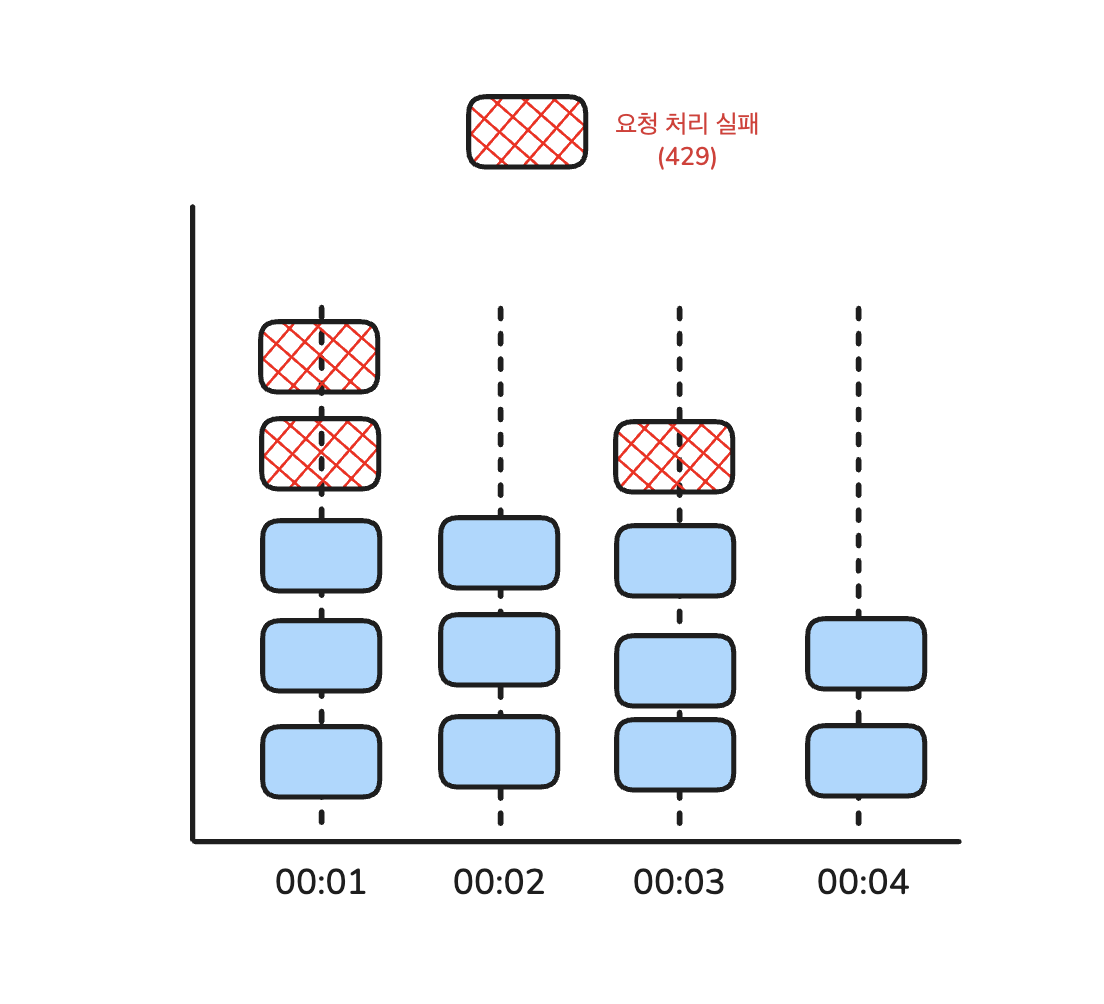
Fixed Window는 일정한 간격의 윈도우로 구간을 나누고, 각 구간마다 카운터를 붙인다. 예를 들어, 1초마다 윈도우를 나누고 임계치를 3으로 설정하면, 요청이 들어올 때마다 카운터를 증가시키고, 임계치를 초과하면 요청을 거부한다.
장점
- 구현이 단순하다. (윈도우 시작 시간과 카운터만 관리)
- 메모리 사용이 매우 효율적이다.
- “1초에 3번”, “1분에 100번” 같은 정책을 직관적으로 표현 가능하다.
단점
- 경계 구간에서 버스트가 발생할 수 있다.
예: 1분에 100회 제한인데 00:59에 100회, 01:00에 100회 요청이 오면 2초 동안 200회 처리가 필요하다. - 짧은 시간 내 몰리는 트래픽을 균등하게 제어할 수 없다.
예: 같은 윈도우 안에서 동시에 100회 요청이 들어오면 모두 허용된다.
만들어보기
type FixedWindowClearConfig = {
  callCount: number;
  maxCount: number;
};

export interface FixedWindowConfig {
  threshold: number; // 윈도우 내 허용되는 최대 요청 수
  windowSizeMs: number; // 윈도우 크기 (밀리초)
  clearConfig?: FixedWindowClearConfig;
}
위의 설명처럼 구현이 단순하다. 윈도우 설정에는 임계치와 윈도우 크기를 지정한다.
clearConfig는 카운팅을 통해 LRU 방식으로 데이터를 삭제하려고 만들어봤다. (Redis의 TTL처럼 구현할 계획이다.)
type FixedWindow = {
  counter: number;
  windowStart: number;
};
윈도우는, 특정 요청 주체의 counter와 마지막 요청 시간을 기록한다.
export class FixedWindowRateLimiter implements RateLimiter {
  private windows: Map<string, FixedWindow> = new Map();

  constructor(private config: FixedWindowConfig) {}

  tryConsume(key: string): void {
    if (
      this.config.clearConfig?.callCount &&
      this.config.clearConfig?.maxCount &&
      this.config.clearConfig.callCount >= this.config.clearConfig.maxCount
    ) {
      this.cleanupExpiredWindows();
      this.config.clearConfig.callCount++;
    }

    if (!this.canConsumeRequest(key)) {
      throw new Error(`Rate Limit Exceeded for key: ${key}`);
    }
    this.increaseCounter(key);
  }

  private canConsumeRequest(key: string): boolean {
    let window = this.windows.get(key);
    if (!window) {
      window = this.createWindow(key);
    }
    this.initializeCounter(window);
    return window.counter < this.config.threshold;
  }

  private increaseCounter(key: string) {
    const window = this.windows.get(key);
    if (!window) {
      throw new Error(`Window not found for key: ${key}`);
    }
    window.counter++;
  }

  private initializeCounter(window: FixedWindow) {
    const now = Date.now();
    if (now - window.windowStart >= this.config.windowSizeMs) {
      window.counter = 0;
      window.windowStart = now;
    }
  }

  private createWindow(key: string): FixedWindow {
    const window: FixedWindow = {
      counter: 0,
      windowStart: Date.now(),
    };
    this.windows.set(key, window);
    return window;
  }

  // TTL 기반 삭제
  private cleanupExpiredWindows() {
    const now = Date.now();
    const ttl = this.config.windowSizeMs * 10;

    for (const [key, window] of this.windows.entries()) {
      if (now - window.windowStart >= ttl) {
        this.windows.delete(key);
      }
    }
  }
}
구현 또한 매우 단순하다.
- 요청이 들어올 때 마다 카운터를 초기화해야한다면 초기화한다. 그렇지 않다면 유지한다
- 카운터 설정에 설정된 임계치를 카운터가 초과했다면 429를 반환한다.
Redis TTL을 비슷하게 구현해보고자 cleanupExpiredWindows()를 clearConfig와 엮어 구현해본 것이 커스터마이징의 전부였고, 구현에 별다른 어려움은 없다.
통합 테스트
import request from "supertest";
import { createApp } from "../../app";
import { createFixedWindowMiddleware } from "../middleware";

describe("Fixed Window Rate Limiter Integration", () => {
  afterEach(() => {
    jest.useRealTimers();
  });

  it("윈도우 내의 임계치에 도달하면 429 에러가 발생한다", async () => {
    const threshold = 10;
    const windowSizeMs = 5000;
    const rateLimiter = createFixedWindowMiddleware({
      threshold,
      windowSizeMs,
    });

    const app = createApp({
      middlewares: [rateLimiter],
    });

    for (let i = 0; i < threshold; i++) {
      const response = await request(app).get("/");
      expect(response.status).toBe(200);
    }

    const rejectedResponse = await request(app).get("/");
    expect(rejectedResponse.status).toBe(429);
    expect(rejectedResponse.body.error).toBe("Too Many Requests");
  });

  it("다른 IP 주소는 독립적인 rate limit을 가진다", async () => {
    const rateLimiter = createFixedWindowMiddleware({
      threshold: 2,
      windowSizeMs: 5000,
    });

    const app = createApp({ middlewares: [rateLimiter] });

    await request(app).get("/").set("X-Forwarded-For", "1.1.1.1");
    await request(app).get("/").set("X-Forwarded-For", "1.1.1.1");

    await request(app).get("/").set("X-Forwarded-For", "2.2.2.2");
    await request(app).get("/").set("X-Forwarded-For", "2.2.2.2");

    const response1 = await request(app)
      .get("/")
      .set("X-Forwarded-For", "1.1.1.1");
    const response2 = await request(app)
      .get("/")
      .set("X-Forwarded-For", "2.2.2.2");

    expect(response1.status).toBe(429);
    expect(response2.status).toBe(429);
  });

  it("동시 요청 처리 시 정확한 카운팅", async () => {
    const threshold = 50;
    const rateLimiter = createFixedWindowMiddleware({
      threshold,
      windowSizeMs: 5000,
    });

    const app = createApp({ middlewares: [rateLimiter] });

    // 50개 동시 요청
    const promises = Array(threshold)
      .fill(null)
      .map(() => request(app).get("/"));

    const responses = await Promise.all(promises);
    const successCount = responses.filter((r) => r.status === 200).length;
    const failCount = responses.filter((r) => r.status === 429).length;

    // 정확히 threshold만큼만 성공
    expect(successCount).toBe(threshold);
    expect(failCount).toBe(0);

    // 추가 요청은 실패
    const extraResponse = await request(app).get("/");
    expect(extraResponse.status).toBe(429);
  });

  it("커스텀 키 생성기 사용 시 올바르게 동작", async () => {
    const rateLimiter = createFixedWindowMiddleware(
      {
        threshold: 2,
        windowSizeMs: 5000,
      },
      {
        keyGenerator: (req) =>
          req.headers["api-key"]?.toString() || "anonymous",
      }
    );

    const app = createApp({ middlewares: [rateLimiter] });

    // API 키 "key1"로 2번 요청
    await request(app).get("/").set("api-key", "key1");
    await request(app).get("/").set("api-key", "key1");

    // API 키 "key2"로 2번 요청
    await request(app).get("/").set("api-key", "key2");
    await request(app).get("/").set("api-key", "key2");

    // 각 키별로 임계치 확인
    const response1 = await request(app).get("/").set("api-key", "key1");
    const response2 = await request(app).get("/").set("api-key", "key2");

    expect(response1.status).toBe(429);
    expect(response2.status).toBe(429);

    // anonymous 키는 별도 카운트
    const anonymousResponse = await request(app).get("/");
    expect(anonymousResponse.status).toBe(200);
  });

  it("윈도우 경계에서 burst traffic 발생 가능 (Fixed Window의 한계)", async () => {
    const threshold = 10;
    const windowSizeMs = 1000; // 1초
    const rateLimiter = createFixedWindowMiddleware({
      threshold,
      windowSizeMs,
    });

    const app = createApp({ middlewares: [rateLimiter] });

    // 실제 시간 기반 테스트
    const startTime = Date.now();

    // 첫 번째 윈도우에서 threshold만큼 요청
    for (let i = 0; i < threshold; i++) {
      const response = await request(app).get("/");
      expect(response.status).toBe(200);
    }

    // 윈도우가 끝날 때까지 대기
    const elapsedTime = Date.now() - startTime;
    const remainingTime = windowSizeMs - elapsedTime + 100; // 여유 시간 추가

    if (remainingTime > 0) {
      await new Promise((resolve) => setTimeout(resolve, remainingTime));
    }

    // 새 윈도우에서 다시 threshold만큼 요청 가능 (threshold * 2 BURST)
    for (let i = 0; i < threshold; i++) {
      const response = await request(app).get("/");
      expect(response.status).toBe(200);
    }
  });

  it("skip 옵션 사용 시 특정 요청은 rate limit 제외", async () => {
    const rateLimiter = createFixedWindowMiddleware(
      {
        threshold: 2,
        windowSizeMs: 5000,
      },
      {
        skip: (req) => req.path === "/health",
      }
    );

    const app = createApp({
      middlewares: [rateLimiter],
      setupRoutes: (app) => {
        app.get("/health", (_req, res) => res.json({ status: "ok" }));
        app.get("/api/users", (_req, res) => res.json({ users: [] }));
      },
    });

    // 일반 요청은 rate limit 적용
    await request(app).get("/api/users");
    await request(app).get("/api/users");
    const limitedResponse = await request(app).get("/api/users");
    expect(limitedResponse.status).toBe(429);

    // health check는 rate limit 제외
    for (let i = 0; i < 10; i++) {
      const response = await request(app).get("/health");
      expect(response.status).toBe(200);
    }
  });

  it("onLimitReached 콜백이 호출된다", async () => {
    let callbackCalled = false;
    let limitedPath = "";

    const rateLimiter = createFixedWindowMiddleware(
      {
        threshold: 1,
        windowSizeMs: 5000,
      },
      {
        onLimitReached: (req, res) => {
          callbackCalled = true;
          limitedPath = req.path;
          res.status(429).json({ error: "Custom limit message" });
        },
      }
    );

    const app = createApp({ middlewares: [rateLimiter] });

    await request(app).get("/test");
    const response = await request(app).get("/test");

    expect(callbackCalled).toBe(true);
    expect(limitedPath).toBe("/test");
    expect(response.status).toBe(429);
    expect(response.body.error).toBe("Custom limit message");
  });

  it("다양한 HTTP 메서드에 대해 동일하게 작동", async () => {
    const rateLimiter = createFixedWindowMiddleware({
      threshold: 5,
      windowSizeMs: 5000,
    });

    const app = createApp({ middlewares: [rateLimiter] });

    // 다양한 메서드로 요청
    await request(app).get("/");
    await request(app).post("/");
    await request(app).put("/");
    await request(app).delete("/");
    await request(app).patch("/");

    // 임계치 도달
    const response = await request(app).get("/");
    expect(response.status).toBe(429);
  });
});
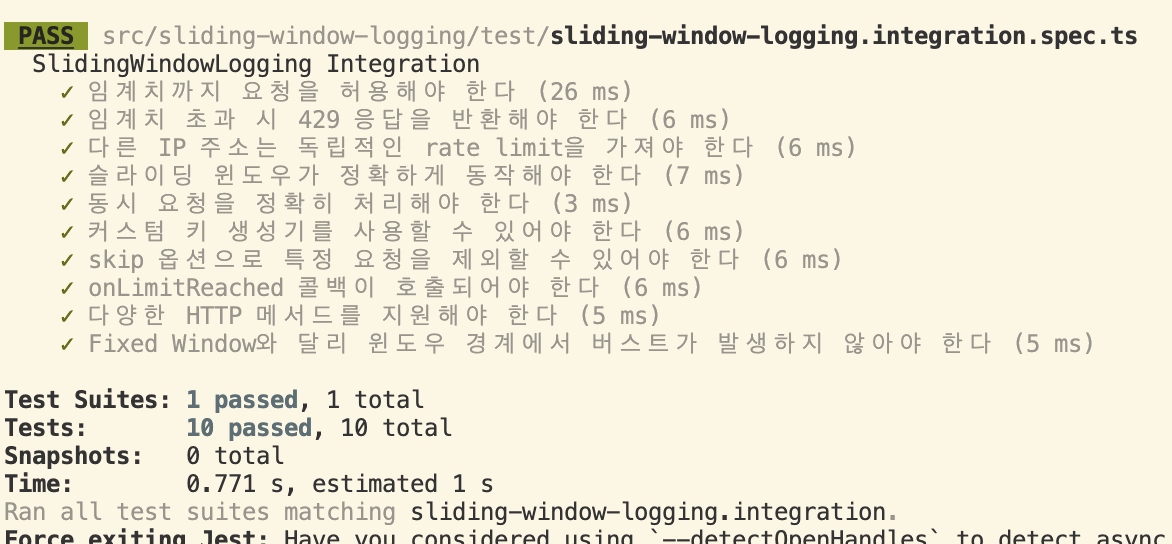
기본적인 기능들과 더불어, 단점들에 대해서도 테스트가 통과되는 모습이다.
Sliding Window Logging
Fixed Window Counter의 가장 큰 한계는 윈도우 경계 부근 버스트를 막을 방법이 없다는 점이다. Sliding Window Logging은 이를 해결한다. 아래 설명들을 보면 알겠지만, 스코어를 저장하여 순서대로 로깅하고 조회할 수 있는 Redis ZSET을 이용하여 구현이 쉽게 가능하다.
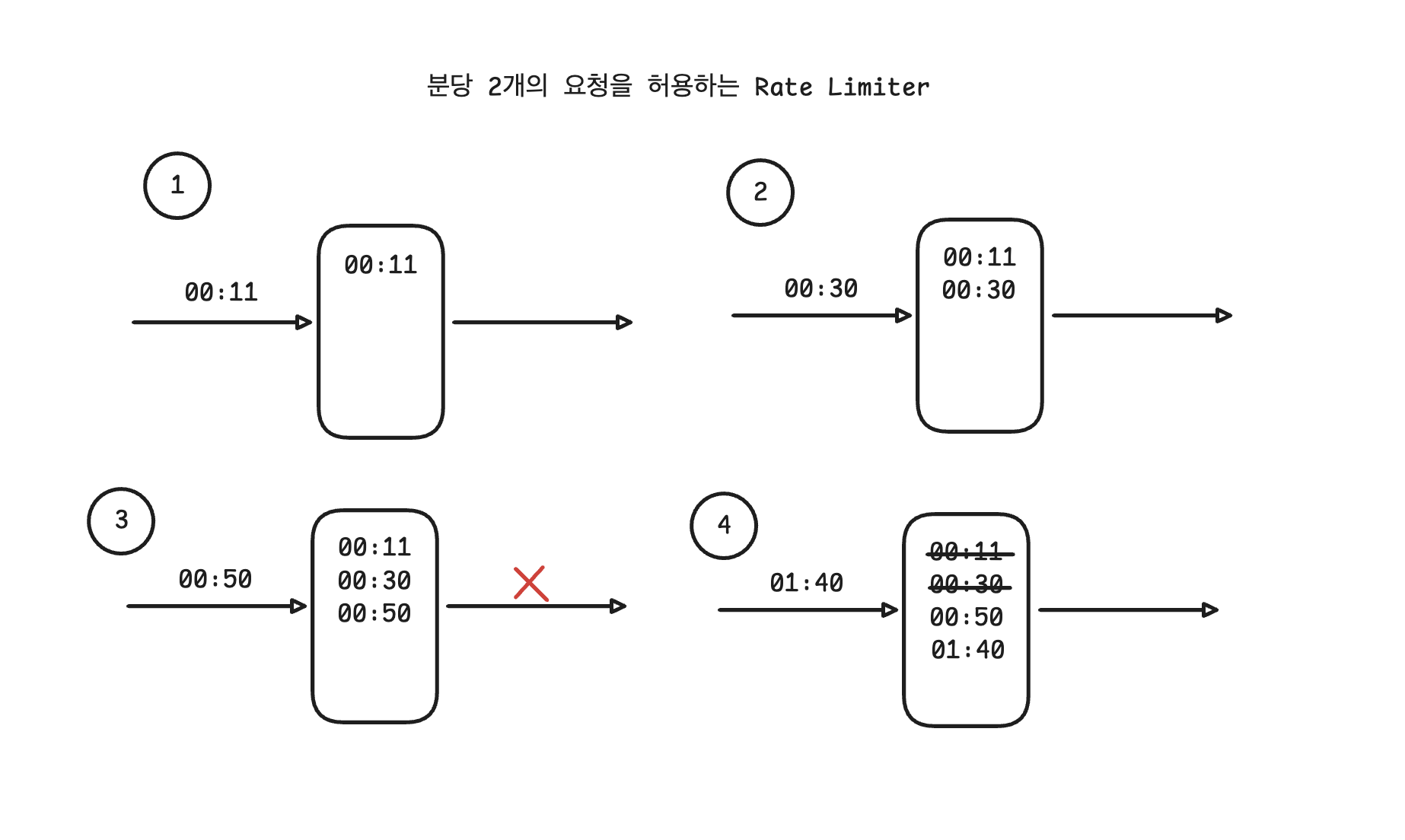
동작 원리
- 요청 시 타임스탬프를 로그에 기록한다. (1, 2)
- 만료된 타임스탬프는 로그에서 제거한다. (3)
- 로그 크기가 임계치 이하이면 요청 허용, 초과하면 거부. (3, 4)
이 방식은 정적인 경계가 없으므로 언제나 임계치 이하로만 처리할 수 있다.
다만, 거부된 요청의 타임스탬프도 기록하기 때문에 Fixed Window 대비 메모리를 더 사용한다.
장점
- 버스트 방지에 강하다.
- 처리율을 안정적으로 유지할 수 있다.
단점
- 로그 크기만큼 메모리 사용.
- 요청 수가 많으면 GC/CPU 부하가 커질 수 있음(배열 filter 기반 구현 시).
만들어보기
export interface SlidingWindowConfig {
  threshold: number; // 윈도우 내 허용되는 최대 요청 수
  windowSizeMs: number; // 윈도우 크기 (밀리초)
}
윈도우 방식의 알고리즘들은 기본 설정은 비슷하다. 이번에도 역시 임계치와 윈도우 사이즈만 기본 설정에 넣었다.
export class SlidingWindowLoggingRateLimiter implements RateLimiter {
  private timestamps: Map<string, number[]> = new Map();

  constructor(private config: SlidingWindowLoggingConfig) {}

  tryConsume(key: string): void {
    const now = Date.now();
    if (!this.canConsumeRequest(key, now)) {
      throw new Error(`Rate limit exceeded`);
    }
    this.addTimestamp(key, now);
  }

  private canConsumeRequest(key: string, now: number): boolean {
    let timestamps = this.timestamps.get(key);
    if (!timestamps) {
      timestamps = [];
      this.timestamps.set(key, timestamps);
    }

    const windowStart = now - this.config.windowSizeMs;

    // 윈도우 내의 요청만 필터링
    const validTimestamps = timestamps.filter(
      (timestamp) => timestamp >= windowStart
    );

    // 메모리 효율을 위해 오래된 타임스탬프 제거
    if (validTimestamps.length !== timestamps.length) {
      this.timestamps.set(key, validTimestamps);
    }

    return validTimestamps.length < this.config.threshold;
  }

  private addTimestamp(key: string, now: number): void {
    const timestamps = this.timestamps.get(key);
    if (!timestamps) {
      throw new Error(`Timestamps not found for key: ${key}`);
    }
    timestamps.push(now);
  }
}
순수 JS로 구현했기에 filter을 사용했지만, 매커니즘은 똑같다.
요청 시점에 타임스탬프 로그들을 적재하고 제거한다. 그리고 요청이 수행될 수 있는지를 검증하여 작업 요청을 통과시키거나 드랍시킨다.
통합 테스트
import request from "supertest";
import { createApp } from "../../app";
import { createSlidingWindowLoggingMiddleware } from "../middleware";
import { SlidingWindowLoggingConfig } from "../config";
import type { Express } from "express";

describe("SlidingWindowLogging Integration", () => {
  let app: Express;
  let config: SlidingWindowLoggingConfig;

  beforeEach(() => {
    jest.useFakeTimers();
    config = {
      threshold: 5,
      windowSizeMs: 1000, // 1초 윈도우
    };
    const middleware = createSlidingWindowLoggingMiddleware(config);
    app = createApp({ middlewares: [middleware] });
  });

  afterEach(() => {
    jest.useRealTimers();
  });

  it("임계치까지 요청을 허용해야 한다", async () => {
    const responses = [];

    // 5개의 요청 모두 성공해야 함
    for (let i = 0; i < 5; i++) {
      const response = await request(app)
        .get("/api/test")
        .set("X-Forwarded-For", "192.168.1.100");
      responses.push(response);
    }

    responses.forEach((response) => {
      expect(response.status).toBe(200);
      expect(response.body.message).toBe("Test endpoint");
    });
  });

  it("임계치 초과 시 429 응답을 반환해야 한다", async () => {
    // 5개의 요청 성공
    for (let i = 0; i < 5; i++) {
      await request(app)
        .get("/api/test")
        .set("X-Forwarded-For", "192.168.1.100");
    }

    // 6번째 요청은 429 응답
    const response = await request(app)
      .get("/api/test")
      .set("X-Forwarded-For", "192.168.1.100");

    expect(response.status).toBe(429);
    expect(response.body.error).toBe("Too Many Requests");
  });

  it("다른 IP 주소는 독립적인 rate limit을 가져야 한다", async () => {
    // IP1에 대해 5개 요청
    for (let i = 0; i < 5; i++) {
      await request(app)
        .get("/api/test")
        .set("X-Forwarded-For", "192.168.1.100");
    }

    // IP2는 여전히 요청 가능
    const response = await request(app)
      .get("/api/test")
      .set("X-Forwarded-For", "192.168.1.200");

    expect(response.status).toBe(200);

    // IP1은 더 이상 요청 불가
    const blockedResponse = await request(app)
      .get("/api/test")
      .set("X-Forwarded-For", "192.168.1.100");

    expect(blockedResponse.status).toBe(429);
  });

  it("슬라이딩 윈도우가 정확하게 동작해야 한다", async () => {
    const ip = "192.168.1.100";

    // 0ms: 2개 요청
    await request(app).get("/api/test").set("X-Forwarded-For", ip);
    await request(app).get("/api/test").set("X-Forwarded-For", ip);

    // 300ms: 2개 요청
    jest.advanceTimersByTime(300);
    await request(app).get("/api/test").set("X-Forwarded-For", ip);
    await request(app).get("/api/test").set("X-Forwarded-For", ip);

    // 700ms: 1개 요청 (총 5개)
    jest.advanceTimersByTime(400);
    await request(app).get("/api/test").set("X-Forwarded-For", ip);

    // 6번째 요청은 실패
    const blockedResponse = await request(app)
      .get("/api/test")
      .set("X-Forwarded-For", ip);
    expect(blockedResponse.status).toBe(429);

    // 1001ms: 처음 2개가 윈도우를 벗어남
    jest.advanceTimersByTime(301);

    // 이제 2개 더 요청 가능
    const response1 = await request(app)
      .get("/api/test")
      .set("X-Forwarded-For", ip);
    const response2 = await request(app)
      .get("/api/test")
      .set("X-Forwarded-For", ip);

    expect(response1.status).toBe(200);
    expect(response2.status).toBe(200);

    // 다시 임계치에 도달
    const finalBlockedResponse = await request(app)
      .get("/api/test")
      .set("X-Forwarded-For", ip);
    expect(finalBlockedResponse.status).toBe(429);
  });

  it("동시 요청을 정확히 처리해야 한다", async () => {
    const ip = "192.168.1.100";

    // 6개의 동시 요청
    const promises = Array(6)
      .fill(null)
      .map(() =>
        request(app)
          .get("/api/test")
          .set("X-Forwarded-For", ip)
          .catch((err) => err.response)
      );

    const responses = await Promise.all(promises);

    // 5개는 성공, 1개는 실패
    const successCount = responses.filter((r) => r.status === 200).length;
    const failCount = responses.filter((r) => r.status === 429).length;

    expect(successCount).toBe(5);
    expect(failCount).toBe(1);
  });

  it("커스텀 키 생성기를 사용할 수 있어야 한다", async () => {
    const customMiddleware = createSlidingWindowLoggingMiddleware(
      config,
      {
        keyGenerator: (req: any) => req.headers["api-key"] || "anonymous",
      }
    );
    const customApp = createApp({ middlewares: [customMiddleware] });

    // 같은 API 키로 5개 요청
    for (let i = 0; i < 5; i++) {
      await request(customApp).get("/api/test").set("api-key", "user-123");
    }

    // 6번째 요청은 실패
    const blockedResponse = await request(customApp)
      .get("/api/test")
      .set("api-key", "user-123");

    expect(blockedResponse.status).toBe(429);

    // 다른 API 키는 성공
    const differentKeyResponse = await request(customApp)
      .get("/api/test")
      .set("api-key", "user-456");

    expect(differentKeyResponse.status).toBe(200);
  });

  it("skip 옵션으로 특정 요청을 제외할 수 있어야 한다", async () => {
    const skipMiddleware = createSlidingWindowLoggingMiddleware(
      config,
      {
        skip: (req: any) => req.headers["skip-rate-limit"] === "true",
      }
    );
    const skipApp = createApp({ middlewares: [skipMiddleware] });

    const ip = "192.168.1.100";

    // 5개의 일반 요청
    for (let i = 0; i < 5; i++) {
      await request(skipApp).get("/api/test").set("X-Forwarded-For", ip);
    }

    // skip 헤더가 있는 요청은 rate limit 무시
    const skipResponse = await request(skipApp)
      .get("/api/test")
      .set("X-Forwarded-For", ip)
      .set("skip-rate-limit", "true");

    expect(skipResponse.status).toBe(200);

    // skip 헤더가 없는 요청은 여전히 차단
    const blockedResponse = await request(skipApp)
      .get("/api/test")
      .set("X-Forwarded-For", ip);

    expect(blockedResponse.status).toBe(429);
  });

  it("onLimitReached 콜백이 호출되어야 한다", async () => {
    const onLimitReached = jest.fn((_req, res) => {
      res.status(429).json({ error: "Too Many Requests" });
    });
    const callbackMiddleware = createSlidingWindowLoggingMiddleware(
      config,
      {
        onLimitReached,
      }
    );
    const callbackApp = createApp({ middlewares: [callbackMiddleware] });

    const ip = "192.168.1.100";

    // 5개의 요청
    for (let i = 0; i < 5; i++) {
      await request(callbackApp).get("/api/test").set("X-Forwarded-For", ip);
    }

    expect(onLimitReached).not.toHaveBeenCalled();

    // 6번째 요청 시 콜백 호출
    await request(callbackApp).get("/api/test").set("X-Forwarded-For", ip);

    expect(onLimitReached).toHaveBeenCalledTimes(1);
    expect(onLimitReached).toHaveBeenCalledWith(
      expect.objectContaining({
        ip: ip,
      }),
      expect.any(Object)
    );
  });

  it("다양한 HTTP 메서드를 지원해야 한다", async () => {
    const ip = "192.168.1.100";

    // 다양한 메서드로 요청
    await request(app).get("/api/test").set("X-Forwarded-For", ip);
    await request(app).post("/api/test").set("X-Forwarded-For", ip);
    await request(app).put("/api/test").set("X-Forwarded-For", ip);
    await request(app).delete("/api/test").set("X-Forwarded-For", ip);
    await request(app).patch("/api/test").set("X-Forwarded-For", ip);

    // 6번째 요청은 메서드와 관계없이 차단
    const response = await request(app)
      .get("/api/test")
      .set("X-Forwarded-For", ip);

    expect(response.status).toBe(429);
  });

  it("Fixed Window와 달리 윈도우 경계에서 버스트가 발생하지 않아야 한다", async () => {
    const ip = "192.168.1.100";

    // 윈도우 끝 부분에서 5개 요청
    jest.advanceTimersByTime(900); // 900ms 시점
    for (let i = 0; i < 5; i++) {
      await request(app).get("/api/test").set("X-Forwarded-For", ip);
    }

    // 100ms 후 (새 윈도우 시작)
    jest.advanceTimersByTime(100);

    // Fixed Window와 달리 여전히 5개가 윈도우 내에 있음
    const response = await request(app)
      .get("/api/test")
      .set("X-Forwarded-For", ip);

    expect(response.status).toBe(429); // 여전히 차단됨

    // 901ms 더 지나야 첫 요청이 윈도우를 벗어남 (총 1001ms)
    jest.advanceTimersByTime(901);

    // 이제 요청 가능
    const allowedResponse = await request(app)
      .get("/api/test")
      .set("X-Forwarded-For", ip);

    expect(allowedResponse.status).toBe(200);
  });
});
Sliding Window Counter
Sliding Window Counter는 Fixed Window Counter와 Sliding Window Logging의 절충안이다.
현재 윈도우와 직전 윈도우의 카운트만 저장해 가중 평균으로 요청률을 추정한다.
계산 공식
추정 요청 수 = 현재 윈도우 카운트 + (직전 윈도우 카운트 × 겹치는 비율)
- 현재 윈도우 카운트: 현재 윈도우 내 요청 수
- 직전 윈도우 카운트: 이전 윈도우 내 요청 수
- 겹치는 비율: 현재 시점에서 이전 윈도우가 겹치는 비율
예시
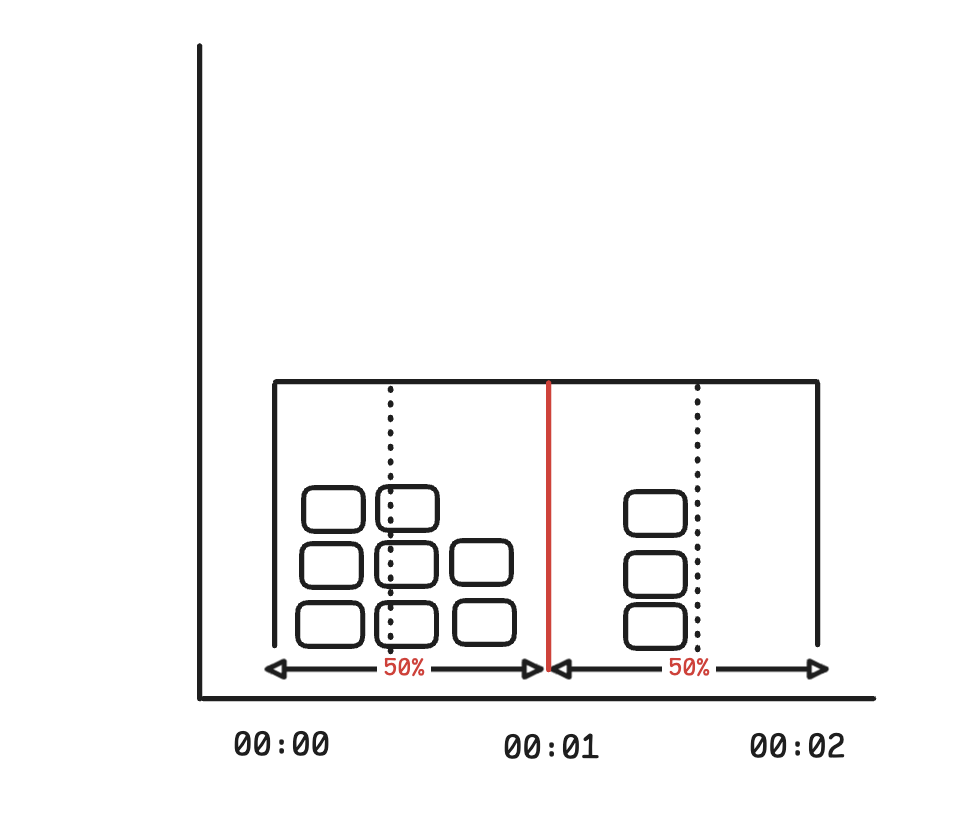
위 그림은 윈도우 크기가 1000ms, 임계치가 10이며 이전 윈도우에서 요청을 8개 처리했고, 현재 윈도우에서 1500ms에서 요청이 3개 들어온 상황이다.
- 현재 윈도우의 요청 카운터: 3
- 직전 윈도우의 요청 카운터: 8
- 직전 윈도우와의 겹치는 비율: 0.5 (1500ms에서 요청이 왔기 때문에, 딱 절반에 해당함)
- 3 + 8 x 0.5 = 7이므로 1500ms에서는 3개의 요청을 더 허용할 수 있다.
장점
- 키당 두 개의 숫자만 저장 → 메모리 효율적.
- 경계 부근에서도 부드럽게 제한 적용 → Fixed Window의 버스트 문제 해결.
단점
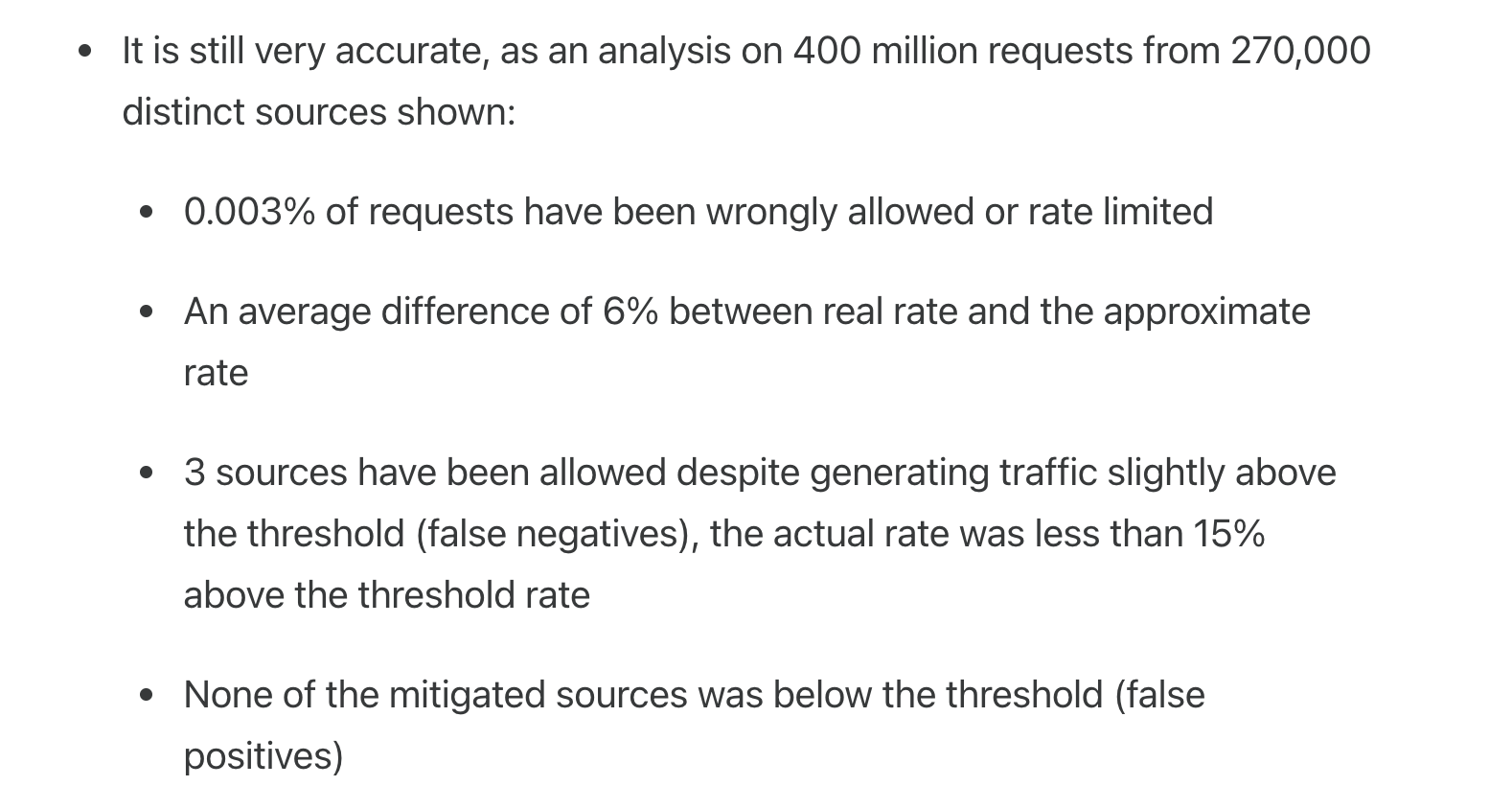
- 근사치 기반이라 100% 정확하진 않음. (직전 시간대에 도착한 요청에 대한 계산은 전혀 수행하지 않음)
Cloudflare의 기술 블로그에 따르면, 40억 개의 요청에 대한 실험 결과에서 문제 발생 비율은 단 0.003%에 불과했다고 한다.
(그래서 단점이라 보기에 좀 애매할 듯)
만들어보기
export interface SlidingWindowCounterConfig {
  threshold: number; // 윈도우 내 허용되는 최대 요청 수
  windowSizeMs: number; // 윈도우 크기 (밀리초)
}
type WindowCounter = {
count: number;
windowStart: number;
};
export class SlidingWindowCounterRateLimiter implements RateLimiter {
private previousWindows: Map<string, WindowCounter> = new Map();
private currentWindows: Map<string, WindowCounter> = new Map();
constructor(private config: SlidingWindowCounterConfig) {}
tryConsume(key: string): void {
const now = Date.now();
const currentWindowStart = this.getCurrentWindowStart(now);
this.updateWindows(key, currentWindowStart);
// 현재 요청을 추가한 후의 예상 rate 계산
const wouldBeRate = this.calculatePotentialRate(key, now, currentWindowStart);
if (wouldBeRate > this.config.threshold) {
throw new Error(`Rate Limit Exceeded for key: ${key}`);
}
this.increaseCounter(key);
}
private increaseCounter(key: string): void {
const currentWindow = this.currentWindows.get(key);
if (!currentWindow) {
throw new Error(`Window not found for key: ${key}`);
}
currentWindow.count++;
}
private updateWindows(key: string, currentWindowStart: number): void {
let currentWindow = this.currentWindows.get(key);
if (!currentWindow || currentWindow.windowStart !== currentWindowStart) {
if (currentWindow) {
this.previousWindows.set(key, currentWindow);
}
currentWindow = { count: 0, windowStart: currentWindowStart };
this.currentWindows.set(key, currentWindow);
}
}
private calculatePotentialRate(key: string, now: number, currentWindowStart: number): number {
const currentWindow = this.currentWindows.get(key);
if (!currentWindow) {
return 1; // 윈도우가 없으면 새 요청 1개만 계산
}
const previousWindow = this.previousWindows.get(key);
const previousWindowStart = currentWindowStart - this.config.windowSizeMs;
// 현재 윈도우 카운트에 1을 추가한 값으로 계산
let rate = currentWindow.count + 1;
if (previousWindow && previousWindow.windowStart === previousWindowStart) {
// 현재 윈도우에서 경과한 시간
const elapsedInCurrentWindow = now - currentWindowStart;
// 이전 윈도우와 겹치는 시간
const overlapTime = this.config.windowSizeMs - elapsedInCurrentWindow;
// 이전 윈도우와 겹치는 비율
const overlapRatio = overlapTime / this.config.windowSizeMs;
// 슬라이딩 윈도우 카운터 공식: 현재 윈도우 + (이전 윈도우 × 겹치는 비율)
rate = currentWindow.count + 1 + Math.floor(previousWindow.count * overlapRatio);
}
return rate;
}
private getCurrentWindowStart(now: number): number {
return Math.floor(now / this.config.windowSizeMs) * this.config.windowSizeMs;
}
cleanup(): void {
const now = Date.now();
const currentWindowStart = this.getCurrentWindowStart(now);
const previousWindowStart = currentWindowStart - this.config.windowSizeMs;
this.previousWindows.forEach((window, key) => {
if (window.windowStart < previousWindowStart) {
this.previousWindows.delete(key);
}
});
this.currentWindows.forEach((window, key) => {
if (window.windowStart < currentWindowStart) {
this.previousWindows.set(key, window);
this.currentWindows.delete(key);
}
});
}
}
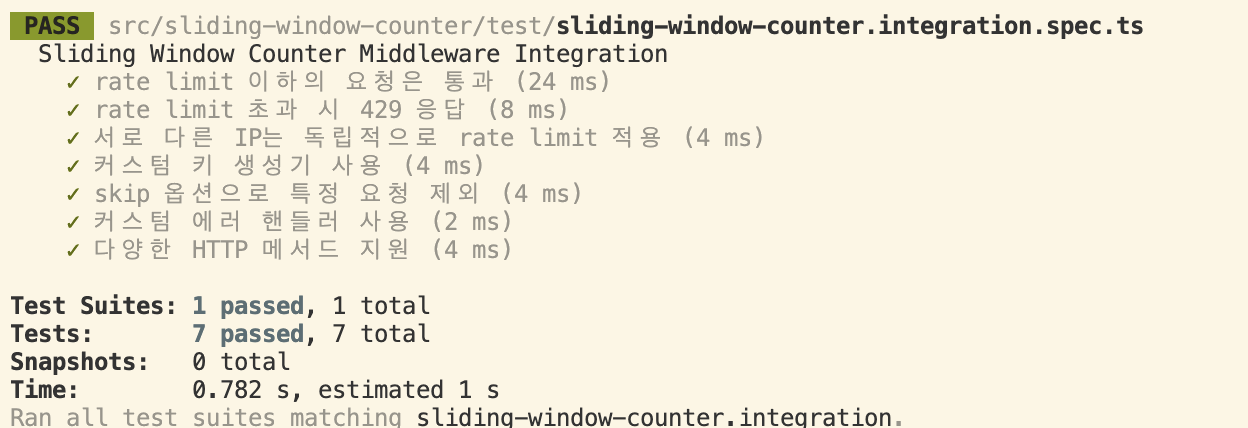
통합 테스트
import request from "supertest";
import { createApp } from "../../app";
import { createSlidingWindowCounterMiddleware } from "../middleware";

describe("Sliding Window Counter Middleware Integration", () => {
  it("rate limit 이하의 요청은 통과", async () => {
    const app = createApp({
      middlewares: [
        createSlidingWindowCounterMiddleware({
          threshold: 3,
          windowSizeMs: 1000,
        }),
      ],
    });

    const responses = await Promise.all([
      request(app).get("/"),
      request(app).get("/"),
      request(app).get("/"),
    ]);

    responses.forEach((response) => {
      expect(response.status).toBe(200);
    });
  });

  it("rate limit 초과 시 429 응답", async () => {
    const app = createApp({
      middlewares: [
        createSlidingWindowCounterMiddleware({
          threshold: 2,
          windowSizeMs: 1000,
        }),
      ],
    });

    await request(app).get("/").expect(200);
    await request(app).get("/").expect(200);
    await request(app).get("/").expect(429);
  });

  it("서로 다른 IP는 독립적으로 rate limit 적용", async () => {
    const app = createApp({
      middlewares: [
        createSlidingWindowCounterMiddleware({
          threshold: 1,
          windowSizeMs: 1000,
        }),
      ],
    });

    await request(app).get("/").set("X-Forwarded-For", "1.1.1.1").expect(200);
    await request(app).get("/").set("X-Forwarded-For", "1.1.1.1").expect(429);
    await request(app).get("/").set("X-Forwarded-For", "2.2.2.2").expect(200);
  });

  it("커스텀 키 생성기 사용", async () => {
    const app = createApp({
      middlewares: [
        createSlidingWindowCounterMiddleware(
          {
            threshold: 2,
            windowSizeMs: 1000,
          },
          {
            keyGenerator: (req) => req.headers["api-key"] as string || "anonymous",
          }
        ),
      ],
    });

    await request(app).get("/").set("api-key", "user1").expect(200);
    await request(app).get("/").set("api-key", "user1").expect(200);
    await request(app).get("/").set("api-key", "user1").expect(429);
    await request(app).get("/").set("api-key", "user2").expect(200);
  });

  it("skip 옵션으로 특정 요청 제외", async () => {
    const app = createApp({
      middlewares: [
        createSlidingWindowCounterMiddleware(
          {
            threshold: 1,
            windowSizeMs: 1000,
          },
          {
            skip: (req) => req.path === "/health",
          }
        ),
      ],
    });

    await request(app).get("/").expect(200);
    await request(app).get("/").expect(429);

    // health 엔드포인트는 rate limit 무시
    await request(app).get("/health").expect(404); // 라우트가 없어서 404지만 429는 아님
  });

  it("커스텀 에러 핸들러 사용", async () => {
    const app = createApp({
      middlewares: [
        createSlidingWindowCounterMiddleware(
          {
            threshold: 1,
            windowSizeMs: 1000,
          },
          {
            onLimitReached: (_req, res) => {
              res.status(503).json({
                error: "Custom Error",
                message: "Please slow down",
              });
            },
          }
        ),
      ],
    });

    await request(app).get("/").expect(200);

    const response = await request(app).get("/").expect(503);
    expect(response.body).toEqual({
      error: "Custom Error",
      message: "Please slow down",
    });
  });

  it("다양한 HTTP 메서드 지원", async () => {
    const app = createApp({
      middlewares: [
        createSlidingWindowCounterMiddleware({
          threshold: 5,
          windowSizeMs: 1000,
        }),
      ],
    });

    await request(app).get("/").expect(200);
    await request(app).post("/").expect(200);
    await request(app).put("/").expect(200);
    await request(app).delete("/").expect(200);
    await request(app).patch("/").expect(200);
    await request(app).get("/").expect(429);
  });

});
정리
이렇게 세 가지 Window 기반 Rate Limiter 알고리즘을 비교하면 다음과 같다.
| 알고리즘 | 메모리 효율 | 구현 난이도 | 버스트 방지 | 정확도 |
| Fixed Window Counter | 매우 높음 | 매우 쉬움 | 낮음 | 중간 |
| Sliding Window Logging | 낮음 | 쉬움 | 높음 | 높음 |
| Sliding Window Counter | 높음 | 중간 | 높음 | 높음(근사치) |
글이 길어져서, 원래 하려고했던 Nest Throttler에서 어떤 알고리즘들을 채택했고 어떻게 커스터마이징했는지는 다음 포스팅에서 해당 시리즈의 마무리로 다뤄보도록 하겠다.